

- Joined
- Nov 21, 2019
- Messages
- 6,792
- Reaction score
- 124,301
- Points
- 11
- Age
- 55
- Location
- Орёл
- 💎VM
- 431,505.50
- New country
- 🌐Единия
- Enneatype
- 5 (?)
- Gender
- Male
- Ashram resident
- Yes
As you already know—and many of you have been using them and benefiting from them for a long time, since I have advertised them extensively across the global internet—I create unique esoteric and developmental programs: VR. VR. Virtual reality.
In other words, my Mahapurna School is far from the only place where my work manifests. And you all know this very well.
The VR-headset version offers the maximum number of possibilities.
However, I have also started making programs for smartphones—more precisely, for Android, which is used by the vast majority of smartphones.
In simple terms:
A smartphone program is installed on a smartphone, turning it into a VR headset.
Do not confuse this with the 360-video option; it is something different.
This is a real VR headset.
Its main advantage, of course, is that it is free!
At the same time, the VR effect is genuine.
It does not replace the quality of a modern VR headset such as the Oculus 2–3. But considering that it is free, it appeals to many people.
Many people do not know how to use it, so I am providing instructions below.
The smartphone programs are not listed in numerical order because some are smartphone adaptations of Oculus programs that already have their own numbering.
DOWNLOAD program No. 6 for smartphones
The description of program No. 6 is available on the Your Yoga website in the VR Programs section.
INSTRUCTIONS:
 STEP 1. Download the APK file
 STEP 2. Find the downloaded file
 STEP 3. Allow installation from unknown sources
Android blocks the installation of unknown apps by default.
Therefore, you must do the following:
 STEP 4. Install the program
 STEP 5. Launch the app
 STEP 6. Insert the phone into the VR headset
In this case, do not confuse an Oculus VR headset with a VR headset for smartphones.
They are different things.
We are talking about an inexpensive device that holds the smartphone in front of your eyes.
You can buy any such headset; it is very inexpensive—around 5–10 dollars.
There are a huge number of models, and you can even assemble or make one yourself for free.
The cheapest option usually recommended is the cardboard Google Cardboard.
Something like this:
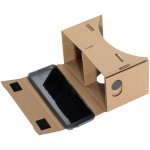
But, honestly, this is such a cheap product that you would have to be truly destitute to buy one. Nevertheless, Google has probably sold hundreds of millions of these boxes worldwide.
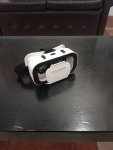
I still recommend something like this:
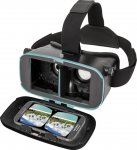
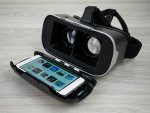
I am not naming any brands because some people think I am advertising something. Search and read the reviews. It is inexpensive and readily available—you will find one.
No additional programs need to be installed.
That is, my programs already split the image into two screens, one for the left eye and one for the right.
All you need:
Such a headset will also be useful to you beyond using my programs.
First, besides my programs, there is a sea of other programs on the global internet.
Many of them are frankly silly, but look around—you may find something worthwhile.
You can also watch 360-degree videos. There are many on YouTube.
 IMPORTANT
A gyroscope is a built-in sensor that detects head rotations.
Without a gyroscope, VR will not work correctly: the screen will not follow your head movements.
If there is no gyroscope, the program may not work or may not provide an immersive effect.
There is a very high probability that your smartphone has a gyroscope. If it does not, your phone is probably very old, and my advice is to buy a new one—it is a useful thing to have!
I especially recommend placing the smartphone in the VR headset as evenly as possible, without any tilting. This applies to all similar programs, especially cheap headsets where everything is held in place by some kind of elastic strap. Position it straight.
You should also adjust the lenses to suit your eyes.
And do not set the smartphone screen brightness too high. Around 50% is quite sufficient.
In other words, my Mahapurna School is far from the only place where my work manifests. And you all know this very well.
The VR-headset version offers the maximum number of possibilities.
However, I have also started making programs for smartphones—more precisely, for Android, which is used by the vast majority of smartphones.
In simple terms:
A smartphone program is installed on a smartphone, turning it into a VR headset.
Do not confuse this with the 360-video option; it is something different.
This is a real VR headset.
Its main advantage, of course, is that it is free!
At the same time, the VR effect is genuine.
It does not replace the quality of a modern VR headset such as the Oculus 2–3. But considering that it is free, it appeals to many people.
Many people do not know how to use it, so I am providing instructions below.
The smartphone programs are not listed in numerical order because some are smartphone adaptations of Oculus programs that already have their own numbering.
DOWNLOAD program No. 6 for smartphones
The description of program No. 6 is available on the Your Yoga website in the VR Programs section.
INSTRUCTIONS:
STEP 1. Download the APK file- Click the link—the download will begin.
- Wait for the download to finish, as the file may be around 100 MB. That is quite large if you have a slow internet connection.
 The file is usually saved in the folder: Downloads.
STEP 2. Find the downloaded file- Open the Files, File Manager or My Files app on your phone.
- Go to the Downloads or Downloads folder.
- Find the file with the .apk extension, for example: VR_YourYoga.apk.
STEP 3. Allow installation from unknown sourcesAndroid blocks the installation of unknown apps by default.
Therefore, you must do the following:
- Go to Phone settings.
- Find the Security or Apps section.
- Open Install unknown apps or Permissions.
- Then enable: Install unknown apps.
STEP 4. Install the program- Tap the .apk file.
- A window will appear asking: Install this app?
- Tap Install.
- Wait for the installation to finish.
- An icon will appear on your phone’s home screen, approximately like this: VR YourYoga with an image of VR goggles.
STEP 5. Launch the app- After installation, an Open button will appear—tap it.
Or find the program shortcut on your phone’s home screen. - The app will launch.
STEP 6. Insert the phone into the VR headsetIn this case, do not confuse an Oculus VR headset with a VR headset for smartphones.
They are different things.
We are talking about an inexpensive device that holds the smartphone in front of your eyes.
You can buy any such headset; it is very inexpensive—around 5–10 dollars.
There are a huge number of models, and you can even assemble or make one yourself for free.
The cheapest option usually recommended is the cardboard Google Cardboard.
Something like this:
But, honestly, this is such a cheap product that you would have to be truly destitute to buy one. Nevertheless, Google has probably sold hundreds of millions of these boxes worldwide.
I still recommend something like this:
I am not naming any brands because some people think I am advertising something. Search and read the reviews. It is inexpensive and readily available—you will find one.
- Open the VR headset cover.
- Place the phone in the center, with the screen facing the lenses.
- Secure the device on your head.
- Enjoy immersing yourself in the virtual world of self-development!
No additional programs need to be installed.
That is, my programs already split the image into two screens, one for the left eye and one for the right.
All you need:
- A phone—you already have one.
- A headset holder for a smartphone—many people already have one; if not, it is easy to purchase.
- That is all you need. In fact, many people already have everything.
Such a headset will also be useful to you beyond using my programs.
First, besides my programs, there is a sea of other programs on the global internet.
Many of them are frankly silly, but look around—you may find something worthwhile.
You can also watch 360-degree videos. There are many on YouTube.
IMPORTANT- The app works only on Android.
- The phone must have a gyroscope. As a rule, all smartphones now have gyroscopes.
A gyroscope is a built-in sensor that detects head rotations.
Without a gyroscope, VR will not work correctly: the screen will not follow your head movements.
If there is no gyroscope, the program may not work or may not provide an immersive effect.
There is a very high probability that your smartphone has a gyroscope. If it does not, your phone is probably very old, and my advice is to buy a new one—it is a useful thing to have!
I especially recommend placing the smartphone in the VR headset as evenly as possible, without any tilting. This applies to all similar programs, especially cheap headsets where everything is held in place by some kind of elastic strap. Position it straight.
You should also adjust the lenses to suit your eyes.
And do not set the smartphone screen brightness too high. Around 50% is quite sufficient.
Last edited:


 I think I read the entire instruction carefully—it’s very good, and everything is clear so far. I wanted to try downloading the program file, but couldn’t find it
  Is it in the thread about the VR headset?


 And breathing in space is still more fun than simply breathing
  What’s more, you can put the VR headset on interested relatives (both adults and children) who struggle with imagination and use this program as an example to teach them what to do to get rid of negativity
  I’ll be looking forward to the other programs with great curiosity!


 I’m so glad you feel more confident

 Aim for at least 400 PPI